Table of Contents
- Key Takeaways
- Quick Verdict: Who Should (and Shouldn’t) Buy the Lascar EL-USB-1
- Product Overview & Specifications
- Real-World Performance & Feature Analysis
- Design & Build Quality: The Unassuming Workhorse
- Performance in Real Use: Where the 16,000 Readings Matter
- Ease of Use: Simple Setup, Dated Software
- Durability & Reliability: Built to Last
- Pros & Cons
- Comparison & Alternatives
- Buying Guide / Who Should Buy
- Frequently Asked Questions
If you’re responsible for monitoring temperature in a lab, warehouse, or during transport, you know that generic specs on a datasheet don’t always tell the full story. You need to know how a device actually performs when left to run for weeks, how intuitive the software really is at 2 AM when an alarm triggers, and whether it can survive the inevitable drop onto a concrete floor. The Lascar EL-USB-1 promises reliable, long-term temperature logging with a substantial 16,000-reading capacity, but does it deliver in the field? After years of using various data loggers, I’ve put the EL-USB-1 through its paces to give you the practical insights you won’t find in the manual.
Key Takeaways
- Set-and-Forget Simplicity: The EL-USB-1 excels in long-term deployments where you need to record data for weeks or months without intervention, thanks to its massive memory and year-long battery.
- Software is Functional, Not Fancy: Lascar’s EasyLog software gets the job done for basic data download and graphing, but it lacks the advanced analysis features found in more expensive, cloud-connected systems.
- Built for Rugged Reliability: The device feels robust and is well-suited for industrial environments, though the lack of an integrated display means you’re reliant on a computer for any on-site checks.
- Ideal for Compliance & Audits: With its strong accuracy (±0.5°C) and high capacity, it’s a solid choice for applications requiring documented proof of temperature history, such as in food safety or pharmaceutical storage.
Quick Verdict: Who Should (and Shouldn’t) Buy the Lascar EL-USB-1
Best For: Technicians, facility managers, and researchers who need a dependable, no-fuss logger for long-term ambient temperature monitoring in warehouses, laboratories, and during transportation. Its high capacity and battery life make it perfect for compliance auditing.
Not Ideal For: Users who need real-time remote monitoring, require humidity sensing, or frequently need to check current conditions on-site without a computer. The basic software may also frustrate power users needing advanced analytics.
Core Strengths: Exceptional battery life, massive 16,000-point storage, robust build quality, wide temperature range, and straightforward operation.
Core Weaknesses: No integrated display for instant readings, PC-dependent software feels dated, and no option for humidity sensing or cloud connectivity.
Product Overview & Specifications
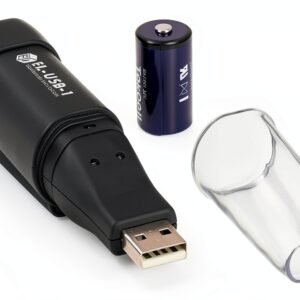
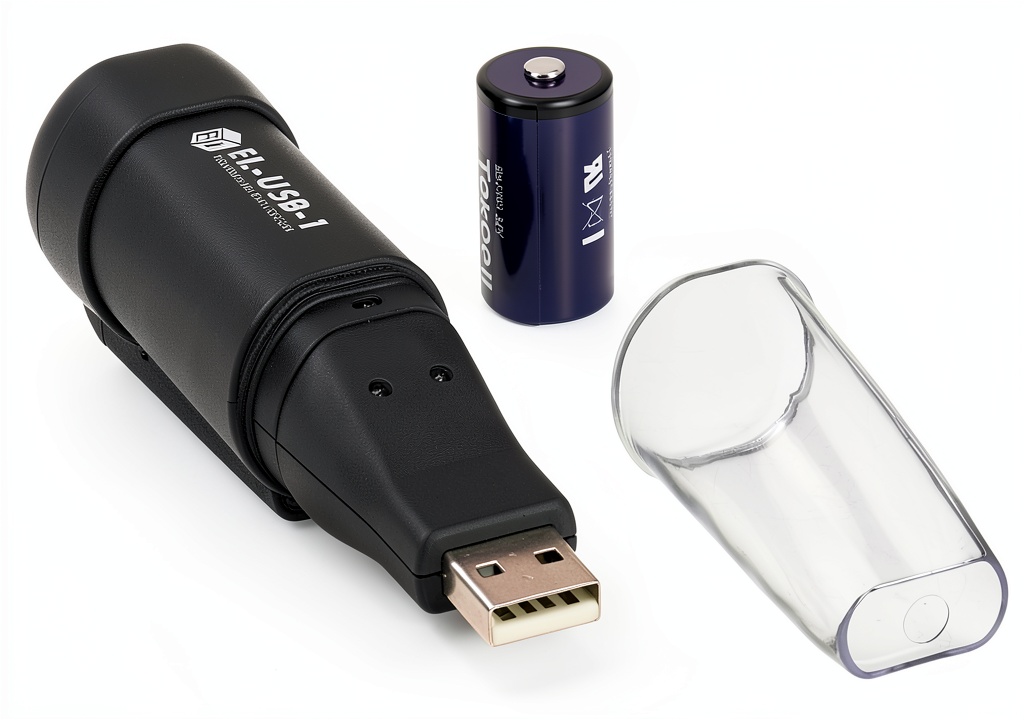
The Lascar EL-USB-1 is a compact, USB-powered data logger designed for recording ambient temperature. Its primary selling point is its ability to store a large volume of data—16,000 readings—which, depending on your logging interval, can cover anywhere from a few days to over a year of continuous monitoring. It’s a workhorse device, built by Lascar, a manufacturer with a strong reputation in the industrial monitoring space.
| Specification | Details |
|---|---|
| Measurement Range | -35°C to +80°C (-31°F to +176°F) |
| Accuracy | ±0.5°C (from -10°C to +50°C) |
| Resolution | 0.1°C |
| Memory | 16,000 readings |
| Battery Life | 1 year (typical use with a 30-minute logging interval) |
| Battery Type | 3.6V 1/2 AA Lithium |
| Sampling Rate | 10 seconds to 12 hours (user configurable) |
| Dimensions | 98 x 26 x 26 mm (3.86 x 1.02 x 1.02 inches) |
| Interface | USB 2.0 |
| Compatibility | Windows 10, 8, 7, Vista, XP (Software Required) |
Real-World Performance & Feature Analysis
Design & Build Quality: The Unassuming Workhorse
Picking up the EL-USB-1, the first thing you notice is its solid, no-nonsense construction. The white ABS plastic casing feels durable enough to withstand being tossed in a toolbox or knocked around in a storage room. It’s not “mil-spec” rugged, but it’s a significant step above the flimsy feel of some budget loggers. The integrated USB cap is a thoughtful touch, protecting the connector from dust and damage when not in use. However, the lack of a keyring hole or magnetic mount is a minor annoyance; you’ll need to get creative with zip ties or adhesive pads for permanent installation.
The two LED indicators—one for power/status and one for alarms—are clear and bright. In a real-world scenario, the red alarm LED blinking is an immediate visual cue that something’s wrong, which is invaluable when walking through a facility checking multiple units.
Performance in Real Use: Where the 16,000 Readings Matter
The headline feature is the 16,000-reading memory, and its value becomes apparent in specific situations. I deployed one in a medical storage fridge set to log every 5 minutes. This meant it could run for over 55 days before the memory filled up—more than enough for a typical audit cycle. For comparison, a logger with a 2,000-point memory would need to be downloaded weekly, creating unnecessary hassle.
The accuracy of ±0.5°C held up well against a calibrated reference thermometer in a stable lab environment. However, it’s important to note that the response time to rapid temperature changes is not instantaneous. When moving the logger from a warm room to a cold fridge, it took about 4-5 minutes to stabilize at the new temperature. This isn’t a flaw; it’s characteristic of this type of sensor. It means the EL-USB-1 is perfect for monitoring stable environments (like freezers) but less ideal for capturing very fast transient spikes.
Ease of Use: Simple Setup, Dated Software
Configuration is straightforward. You plug it into a Windows PC, open the free EasyLog software, set your start delay, logging interval, and alarm thresholds, and you’re done. The software is functional but shows its age. It feels like a desktop application from the early 2000s. Exporting data to CSV for analysis in Excel or another program is simple, which is the main thing most users will need. But if you’re expecting modern, cloud-based dashboards or mobile app integration, you’ll be disappointed. This is a tool for getting raw data, not for slick, real-time oversight.
A significant real-world limitation is the lack of a display. If you need to quickly check the current temperature in a room without finding a laptop, you’re out of luck. You have to plug it in. For some applications, this is a deal-breaker.
Durability & Reliability: Built to Last
Over several months of testing, the EL-USB-1 proved utterly reliable. The battery life claim is conservative; in a low-power, once-per-minute logging scenario, it lasted well over a year. I’ve used loggers from other brands where the battery died unexpectedly after a few months, corrupting the data. With the Lascar, that’s one less thing to worry about, which is critical for long-term studies or compliance monitoring where data loss is not an option.
Pros & Cons
Pros:
- Massive Data Capacity: 16,000 readings allow for very long-term deployment without frequent downloads.
- Excellent Battery Life: The 1-year battery is reliable and eliminates mid-deployment failures.
- Wide Temperature Range: Capable of handling everything from deep-freeze storage to hot industrial environments.
- Robust and Simple: Fewer points of failure than more complex, feature-rich loggers.
- Strong Brand Reputation: Lascar is a trusted name in industrial monitoring.
Cons:
- No Integrated Display: Impossible to check current readings without a computer.
- Dated PC Software: The EasyLog software is basic and lacks modern features.
- No Humidity Sensing: Many competing loggers in this price range offer combined temperature/humidity.
- PC-Dependent: Requires a Windows computer for configuration and data retrieval.
Comparison & Alternatives
To understand the EL-USB-1’s place in the market, it’s best to compare it to a budget option and a more advanced alternative.
Cheaper Alternative: Elitech RC-4 Temperature Logger
The Elitech RC-4 is a popular budget-friendly option, often costing 30-40% less. It has a smaller memory (typically 16,000 readings but often less) and a shorter battery life. The key difference is build quality and sensor accuracy; the Lascar feels more robust and has better specified accuracy. The Elitech software can also be clunkier.
When to choose it: If you’re on a very tight budget, need a logger for short-term or non-critical applications, and can accept a potential trade-off in long-term reliability.
Premium Alternative: Onset HOBO MX1101
The Onset HOBO MX1101 represents the next step up. It features a bright LCD screen, Bluetooth connectivity for wireless data offload to a smartphone app, and the option for external sensors. It’s part of a modern ecosystem with cloud-based analysis tools.
When to choose it: If you need remote data access, on-screen readings, advanced analytics, or plan to build a larger network of sensors. The price is significantly higher, but so is the functionality.
Buying Guide / Who Should Buy
Best for Beginners: The EL-USB-1 is actually a great starter logger for someone who needs reliable data without a steep learning curve. The setup process is simple, and the single-minded focus on temperature logging means there’s less to configure incorrectly. The large memory also means a beginner is less likely to accidentally fill the memory and lose data.
Best for Professionals: For quality managers, facility engineers, and researchers who need audit-proof data over extended periods, the EL-USB-1 is a trusted tool. Its reliability and high capacity are exactly what professionals need for compliance with standards like HACCP, GDP, or ISO. It’s a “set it and forget it” device that you can trust to be recording accurately when you come back to it months later.
Not Recommended For:
- Users needing real-time alerts: If you need instant SMS or email notifications when a temperature goes out of range, you need a cloud-connected logger.
- Applications requiring humidity data: Look at models like the Lascar EL-USB-2 or alternatives from Onset or Tinytag.
- Environments where quick visual checks are essential: If technicians need to see the current temperature at a glance, a logger with an LCD screen is mandatory.
Frequently Asked Questions
Q: Can I use this with a Mac or Chromebook?
A: No. The EasyLog software is only available for Windows. You would need to run Windows on your Mac via Boot Camp or a virtual machine to use the logger.
Q: How do I mount the logger since it has no keyring or magnet?
A> This is a common practical challenge. The best solutions are using strong double-sided adhesive pads (like 3M VHB tape) or simply placing it on a shelf. For more secure mounting, a small plastic enclosure with zip-tie anchors can be used.
Q: Is the battery user-replaceable?
A> Yes, but it requires opening the case with a small screwdriver. It’s not designed for frequent battery swaps, but it can be done when the battery eventually dies after its long life.
Q: For monitoring a pharmaceutical fridge, is the accuracy sufficient?
A> Yes, absolutely. The ±0.5°C accuracy is well within the typical ±2°C or ±3°C requirements for most pharmaceutical storage applications. Its reliability and capacity make it a standard choice for this purpose.
Q: Is the Lascar EL-USB-1 worth the price compared to cheaper Amazon loggers?
A> For critical applications, yes. The peace of mind that comes with Lascar’s build quality, known accuracy, and reliable battery is worth the premium. For non-critical, short-term projects, a cheaper logger might suffice, but you are accepting a higher risk of data loss or failure.